
Photoshop Private Tuition £350 or 221 Tuition £250 pp
Photoshop Vs Lightroom
This Photoshop Training Course is available as a small group course, as 121 Photoshop Tuition or as Virtual Photoshop Training online.
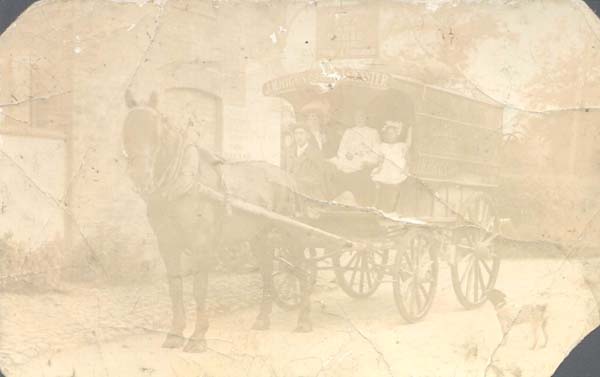
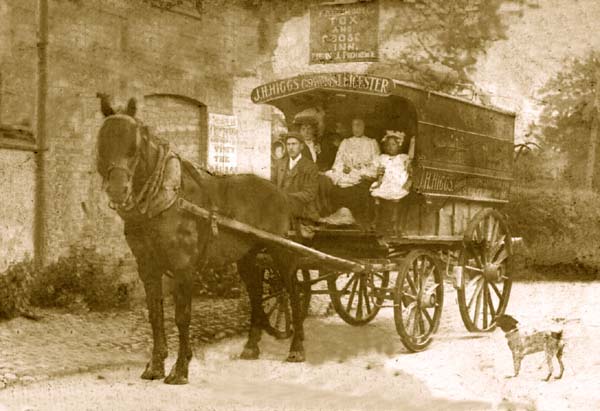
The main difference between Lightroom and Photoshop is Photoshop’s ability to work with layers. This allows us to replace a boring sky, cutout a person from one image to place on another or repair old photographs.
These one day Photoshop group courses will suit anyone from the complete novice to the intermediate Photoshop or Lightroom user. The beginners courses are structured to worked with any version of Photoshop although the screen may appear be slightly different with the various editions.
A few before and after edits processed on a Photoshop Training Course


Book an Photoshop Training Course below.
- Photoshop 121 Private Tuition £350
- Photoshop 221 Tuition £250 each. Subject to finding a 2nd student.
Having attending several course on digital photo editing using Photoshop covering the very basic to more sophisticated techniques I must stress complete satisfaction with Glen, the course content, and teaching methods used. I am now able to perform with much greater efficiency with some very good results. I have recommended these to several friends and would continue in the future. Malcolm Wootton
Click below for more details
Which Version of Lightroom & Photoshop to get.
Course Outline
During the morning we will look at creating exhibition quality prints. This will include basic adjustments for colour and contrast followed by adding borders, cropping, sharpening and resizing images.
In the afternoon we encourage each person to bring a project they would like help with. If we have time I’ll demonstrate some more advanced techniques.
- The new subscription versions of Lightroom and Photoshop can be confusing so hopefully this will make it clearer.
- Up until version 6 you purchased Lightroom and Photoshop outright. Lightroom costs about £120 and Photoshop was about £600.
- Lightroom CC is the slower online version of Lightroom which is not as powerful as Lightroom Classic CC and you require an internet connection.
- Lightroom Classic and Photoshop are so well integrated that we us we use Include some Photoshop on the Lightroom Course.
- Lightroom CC is really intended for people uploading and editing from their phone or iPads as these have limited storage.
- I find 20GB is plenty as I only upload JPGs and store all my RAW files on external USB HDDs.
- A couple of years ago Adobe went to a subscription model and called it the Creative Cloud (CC). Lightroom Classic, Lightroom CC and Photoshop CC together now cost about £10 PCM which also includes 20GB of online storage.
- Originally Lightroom CC was the same as Lightroom 6 but as Adobe added new features to Lightroom CC the CC version became more powerful than LR6 and included an online version of Lightroom called Lightroom Mobile.
- Last year Adobe had a stupid Lightroom name rebranding which caused huge confusion to photographers everywhere. Lightroom CC was renamed Lightroom Classic CC (I will refer to this as Lightroom Desktop) and Lightroom Mobile became the online version of Lightroom CC.
I believe the best package to get is the £9.98 PCM Photography package which includes
- Lightroom CC
- Lightroom Classic CC
- Photoshop CC
- 20GB of cloud storage
If you follow this Affiliate Link it should take you to the correct page.
Thank you for booking a Digital Photography Course
Thank you for booking the Lightroom Course. Coffee,Tea & biscuits are provided on arrival between 9.30am and 9.45am
- There are a few things you can do before the course to ensure your experience runs smoothly
- The course starts at 9.45am prompt with coffee and biscuits on arrival, between 9.30am and 9.45am, and it runs through until about 5pm.
- We do have limited parking for six cars so if you have the choice of a smaller car it is less of a squeeze.
- Please meet at 25 Westerby Lane, Smeeton Westerby for registration between 9.30am and 9.45am.
- https://www.digitalphotographycourses.co.uk/contact-digital-photography-courses.html
- If you have any questions please don’t hesitate to contact us or visit the FAQ’s page at https://www.digitalphotographycourses.co.uk/faq.html
- Cancellations within 48 hours, or failure to turn up on the day, are non refundable – See our full T&Cs here – https://digitalphotographycourses.co.uk/terms-and-conditions.html
A very helpful course and I feel much more confident in finding my way around Photoshop Elements. I can’t wait to get home and try out my new found knowledge. Margaret
A really great day. I have so much more confident in the work flow of being able to take the images from the camera through the whole process right up to printing. Teresa Lardner – Photoshop Course.
I wanted to learn the basics and improve a photograph by enhancing colours and doing a cut-out. This was an excellent relaxed Photoshop course where we were able to work at our own pace & cover the projects we wanted.
Annalli
I’ve attended Glen’s Photoshop courses for years and I never ceased to be amazed at his depth of Photoshop knowledge. As a professional wedding photographer I have found his techniques invaluable and immensely time saving. I would definitely recommend you attend one of Glen’s Photoshop courses. John Wright